Student licence
Every Pro feature — MC/DC, the full HTML report, annotated source, the exports — free while you study. Six months at a time, and always to the end of a term rather than the middle of one. Renewed by asking again. No card, nothing to cancel.
How it works
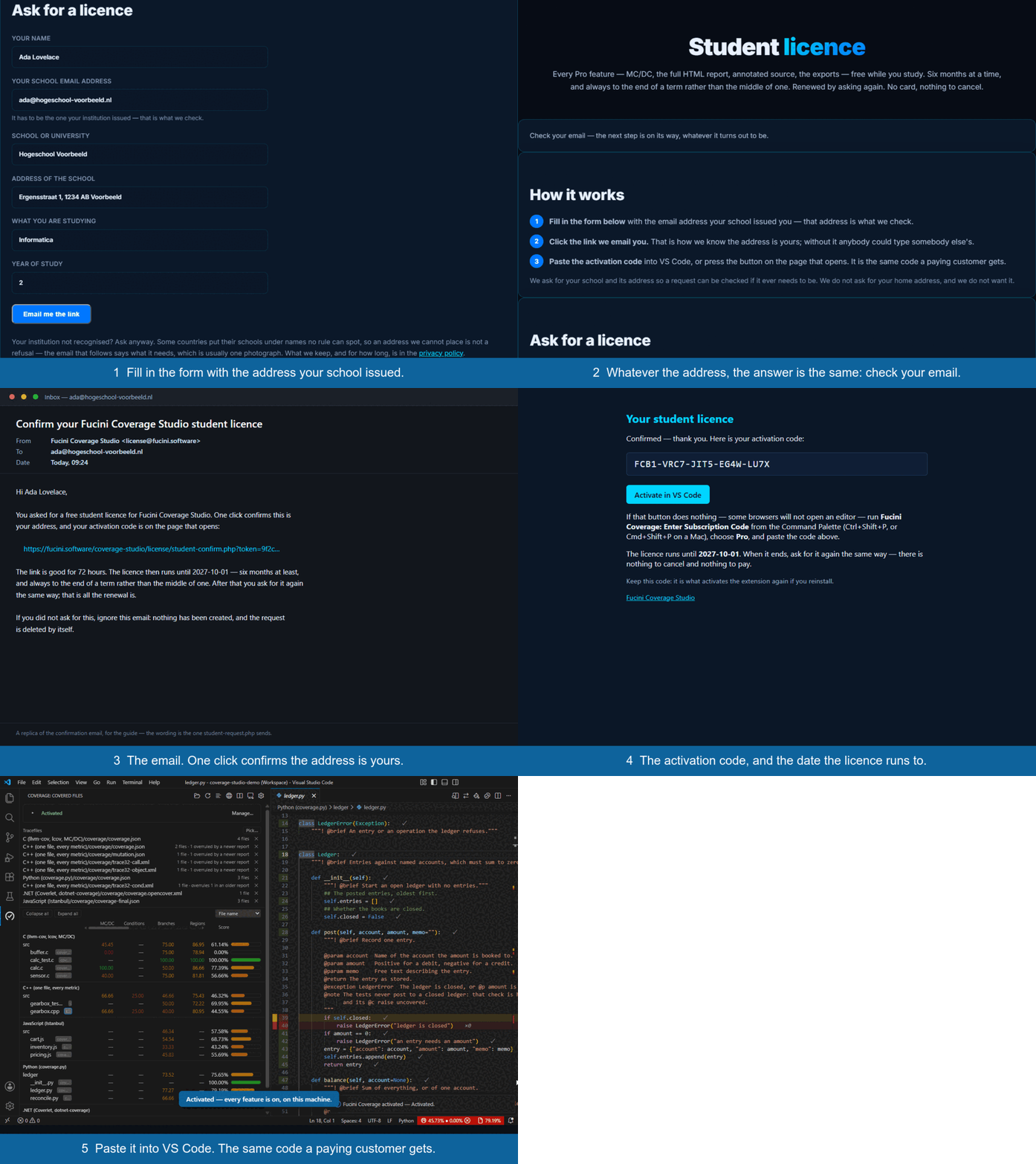
- Fill in the form below with the email address your school issued you — that address is what we check.
- Click the link we email you. That is how we know the address is yours; without it anybody could type somebody else's.
- Paste the activation code into VS Code, or press the button on the page that opens. It is the same code a paying customer gets — and it covers Coverage Studio for Visual Studio on the same machine as well, for as long as the grant runs.
We ask for your school and its address so a request can be checked if it ever needs to be. We do not ask for your home address, and we do not want it.
Ask for a licence
Your institution not recognised? Ask anyway. Some countries put their schools under names no rule can spot, so an address we cannot place is not a refusal — the email that follows says what it needs, which is usually one photograph. What we keep, and for how long, is in the privacy policy.